
ERP / E-commerce Connector
Connector ERP and PrestaShop
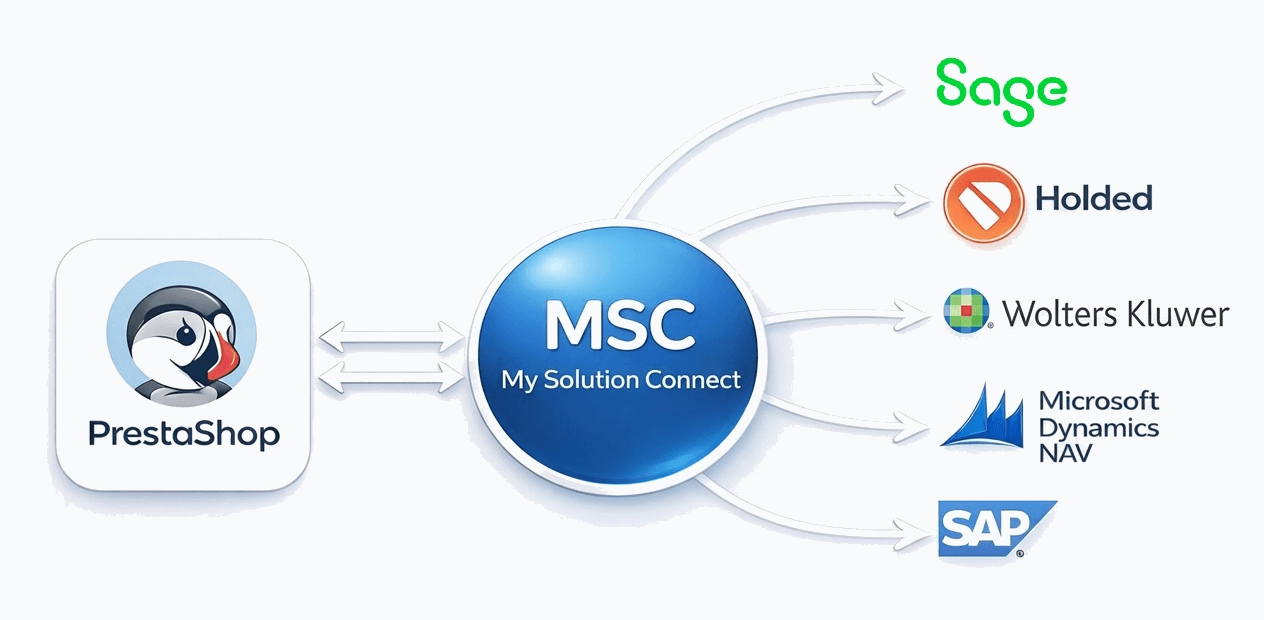
Open-Flux is a middleware connector that automatically synchronizes your ERP with your PrestaShop store. Products, variants, stock, pricing, customers, and orders are exchanged at the frequency you choose, with no manual re-entry.

Definition
What is a ERP PrestaShop connector?
A ERP PrestaShop connector is middleware that automatically synchronizes products, stock, pricing, customers, and orders between the ERP and the PrestaShop e-commerce platform, eliminating any manual re-entry.
In practice, this connector enables you to:
- Automatically export your products, stock, and pricing from ERP to PrestaShop
- Automatically import orders placed on PrestaShop into ERP
- Synchronize stock levels at a defined frequency to prevent overselling
- Update order statuses and send tracking numbers
Open-Flux is the connector solution developed by MySolutionConnect, a company with over 35 years of experience in the business management world. With over 1,000 customers and 100 partners, Open-Flux is compatible with the main ERP systems on the market (Sage, Cegid, EBP, Wavesoft...) and the leading e-commerce platforms (PrestaShop, PrestaShop, WooCommerce, Magento...).
Who is this connector for?
The ERP PrestaShop connector is designed for companies that:
- Use ERP for sales management and/or accounting
- Have a PrestaShop store (all plans: Basic, PrestaShop, Advanced, Plus)
- Want to automate data exchange between their ERP and e-commerce
- Want to eliminate manual tasks and the related errors
- Need a single, unified view of their online and offline activity
The challenge of ERP / E-commerce integration
Without a connector, teams must manually re-enter web orders into the ERP, update stock on the website, and check price consistency. These repetitive tasks take time, create errors, and slow down e-commerce growth.
An automated connector like Open-Flux removes these frictions and allows teams to focus on higher-value work: customer service, business development, and sales analysis.
Challenges
Why connect ERP with PrestaShop?
Connecting your ERP to your PrestaShop store transforms your daily operations. Here is the before/after comparison once the connector is implemented.
- Manual re-entry of every PrestaShop order into Sage
- Manual stock updates multiple times a day
- Risk of errors in pricing, quantities, and references
- Frequent overselling and stockouts
- Time wasted on repetitive tasks
- Customer data split across two systems
- Difficulty handling high order volumes
- Tracking information not sent to the customer
- Orders automatically imported into ERP
- Stock synchronized at the frequency you choose
- Reliable, consistent data across both systems
- PrestaShop stock always aligned with real stock
- Teams freed up for higher-value work
- Unified customer view (history, addresses, terms)
- Ability to handle order spikes without overload
- Tracking numbers sent automatically
A company processing several dozen orders per day can spend hours daily re-entering them without a connector. With Open-Flux, this task is automated 100%, freeing up valuable time that can be redirected to customer service or business development.
Use cases
Industries covered
The ERP PrestaShop connector adapts to the specific needs of many industries. Here are the most common use cases:
Fashion & apparel
Variant management (sizes, colors), seasonal collections, multi-brand
Cosmetics & beauty
Batch numbers, expiry dates, product regulations
Spare parts
Large catalogs, technical references, vehicle compatibility
Wines & spirits
Vintages, appellations, batch-level stock management
Industry & distribution
B2B pricing, customer-specific terms, technical catalogs
Home equipment
Furniture, decor, appliances, bulky products
Sports & leisure
Sports equipment, leisure goods, accessories
Parapharmacy
Dietary supplements, health products, traceability
Open-Flux adapts to all industries using ERP and PrestaShop. Contact us to discuss your specific needs.
Synchronized data
Data flows between ERP and PrestaShop
Open-Flux manages 8 main data flows, each configurable to fit your needs (frequency, filters, transformations).
| Flow | Direction | Included data |
|---|---|---|
| Products | Sage → PrestaShop | SKU reference, EAN code, name, short and long description, sales price excl. VAT and incl. VAT, VAT rate, weight, dimensions, brand, family |
| Variants | Sage → PrestaShop | Variants (sizes, colors, materials), link to parent product, price and stock per variant, specific EAN codes |
| Stock | Two-way | Physical stock, available-to-sell stock, incoming stock, by warehouse or consolidated multi-warehouse. Automatic update during order import. |
| Pricing | Sage → PrestaShop | Prices by customer group (B2B), customer-specific pricing, scheduled promotions, compare-at prices |
| Customers | Two-way | Customer account (email, name, company), billing and shipping addresses, phone numbers, commercial terms, price group |
| Orders | PrestaShop → Sage | Header (reference, date, totals), lines (products, quantities, prices), discounts, shipping fees, payment method, selected carrier |
| Status | Sage → PrestaShop | Order status updates (preparing, shipped, delivered), tracking number, carrier name |
| Documents | Sage → PrestaShop | PDF invoices generated by Sage automatically sent to the customer |
Details of synchronized product data
Below is the complete list of product information that can be synchronized from ERP to PrestaShop:
Basic information
- Product reference (SKU)
- EAN / Barcode
- Short name
- Long description / product sheet
- Brand / Manufacturer
- Family / Category
Commercial information
- Sales price excl. VAT
- Sales price incl. VAT
- Applicable VAT rate
- Compare-at price / promotional price
- Pricing by customer group
- Customer-specific pricing terms
Logistics information
- Weight (gross / net)
- Dimensions (L x W x H)
- Sales unit
- Packaging
- Lead time
Variants
- Size variants
- Color variants
- Other custom attributes
- Stock per variant
- Price per variant
Each flow is configurable: you define the selection criteria (which products to export), the transformation rules (field mapping), and the synchronization frequency that fits your business.
How it works
How does the Sage PrestaShop connector work?
Open-Flux acts as an intelligent gateway between ERP and PrestaShop. Here is how it works:
Technical architecture
The connector is deployed on a workstation or server with access to your ERP environment. It communicates with:
- ERP: via Sage Business Objects and SQL Server database access
- PrestaShop: via PrestaShop’s official REST and GraphQL Admin API
Outbound flows (Sage → PrestaShop)
Product, stock, and pricing data are extracted from ERP based on your criteria. The connector applies transformation rules (field mapping, conversions) and then sends the data to PrestaShop through its API. Products are created or updated automatically in your store.
Synchronization runs at the frequency you define: every 5 minutes, 15 minutes, 1 hour, or on a custom schedule.
Inbound flows (PrestaShop → Sage)
The connector regularly queries PrestaShop to retrieve new orders. For each order, it creates in ERP:
- The customer: automatically created if new, or matched to an existing customer (email lookup)
- The sales document: quote, order, delivery note, or invoice depending on your configuration
- Order lines: products, quantities, unit prices, discounts if applicable
- Additional information: shipping fees, payment method, carrier, customer comments
Error handling and logs
Each synchronization is recorded in a detailed log. If an error occurs (unknown product, insufficient stock, invalid customer, incorrect format), the connector:
- Generates an alert (email, dashboard)
- Flags the record as an error pending correction
- Continues processing the remaining data
- Allows manual restart after correction
Deployment
Connector implementation
Implementing an ERP PrestaShop connector with Open-Flux follows a structured 4-phase process.
After go-live, our team remains available: technical support, configuration adjustments, and onboarding of new flows. You will have a dedicated contact who understands your environment.
Required setup
Technical requirements
To deploy the Open-Flux connector between ERP and PrestaShop, the following elements are required:
- Access to the Sage management server: ideally via remote desktop; otherwise via TeamViewer with a permanent session (during setup)
- SQL Server database access: server name, database name, username/password with SQL Server authentication
- .gcm file: location of the .gcm file in your environment pointing to the correct Sage folder, plus application username/password to access Sage sales management
- Sage Business Objects: must be installed on the machine where the connector will be deployed
- PrestaShop plan: Basic, PrestaShop, Advanced, or Plus (all supported)
- Admin access: account with admin permissions on the store
- Custom App: created in the PrestaShop admin, with the required permissions (products, inventory, orders, customers)
- Internet access: outbound HTTPS access to the PrestaShop API
- Connection stability: stable connection to ensure reliable synchronizations
We recommend having an ERP staging environment (a copy of your database) for configuration and testing. It must be structurally identical to production.
Best practices
Mistakes to avoid
Here are the most common mistakes when implementing an ERP / E-commerce connector and how to avoid them:
Benefits
Benefits of Open-Flux
Time savings
Eliminate hours of manual re-entry every day. Orders, stock, and products sync automatically. Your team focuses on higher-value tasks.
Data reliability
Reduce human errors. Prices, references, and quantities remain identical between ERP and PrestaShop. Fewer issues and claims.
Controlled stock
Synchronization at the frequency you choose. Prevent overselling that hurts satisfaction and stockouts that reduce revenue.
Scalability
The connector handles activity peaks (sales, Black Friday) smoothly. More orders without proportionally increasing workload.
Tailored configuration
Every company has its own rules. Open-Flux adapts: filters, transformation rules, custom mapping, and adjustable frequencies.
Proven expertise
Over 35 years of experience, more than 1,000 customers, and 100 partners. A team that masters ERP and the specifics of your business.

Frequently asked questions
FAQ — ERP PrestaShop Connector
Do you have another question?
Contact usGlossary
Technical glossary
Definitions of technical terms used in the context of an ERP / E-commerce connector.
Ready to connect ERP and PrestaShop?
Request a free personalized demo. Our team reviews your environment and proposes a solution tailored to your needs.
Last update: February 2026 • View all our connectors
